What Is a VPN? The Complete Beginner's Guide (2026)

Not sure what a VPN actually does — or whether you need one? This complete guide explains what is a VPN, how it works, and when it genuinely protects you.
Introduction
Picture this: you're sitting in a coffee shop, using the free Wi-Fi to check your bank account or finish up some work before a meeting. The connection feels normal. Everything looks fine. What you probably don't know is that on that same network, someone with a $30 piece of software and fifteen minutes of YouTube tutorials could be watching exactly what you're doing.
This isn't a scare tactic. It's a documented reality. Public Wi-Fi interception attacks — sometimes called "man-in-the-middle" attacks — are one of the most common and underreported forms of data theft. And they're just one reason why millions of people search "what is a VPN" every month.
Here's the honest version of this guide: a VPN is genuinely useful, but it's not a magic shield. Most articles on this topic are written either by VPN companies trying to sell you their product or by affiliate review sites incentivized to recommend the most expensive options. This one isn't. What follows is a clear, complete explanation of what a VPN does, how it works under the hood, where it actually protects you — and where it doesn't.
By the time you finish reading, you'll know whether you need a VPN, which features matter, how to evaluate your options honestly, and what "VPN-level" protection actually means in practice.
What Is a VPN, Really?
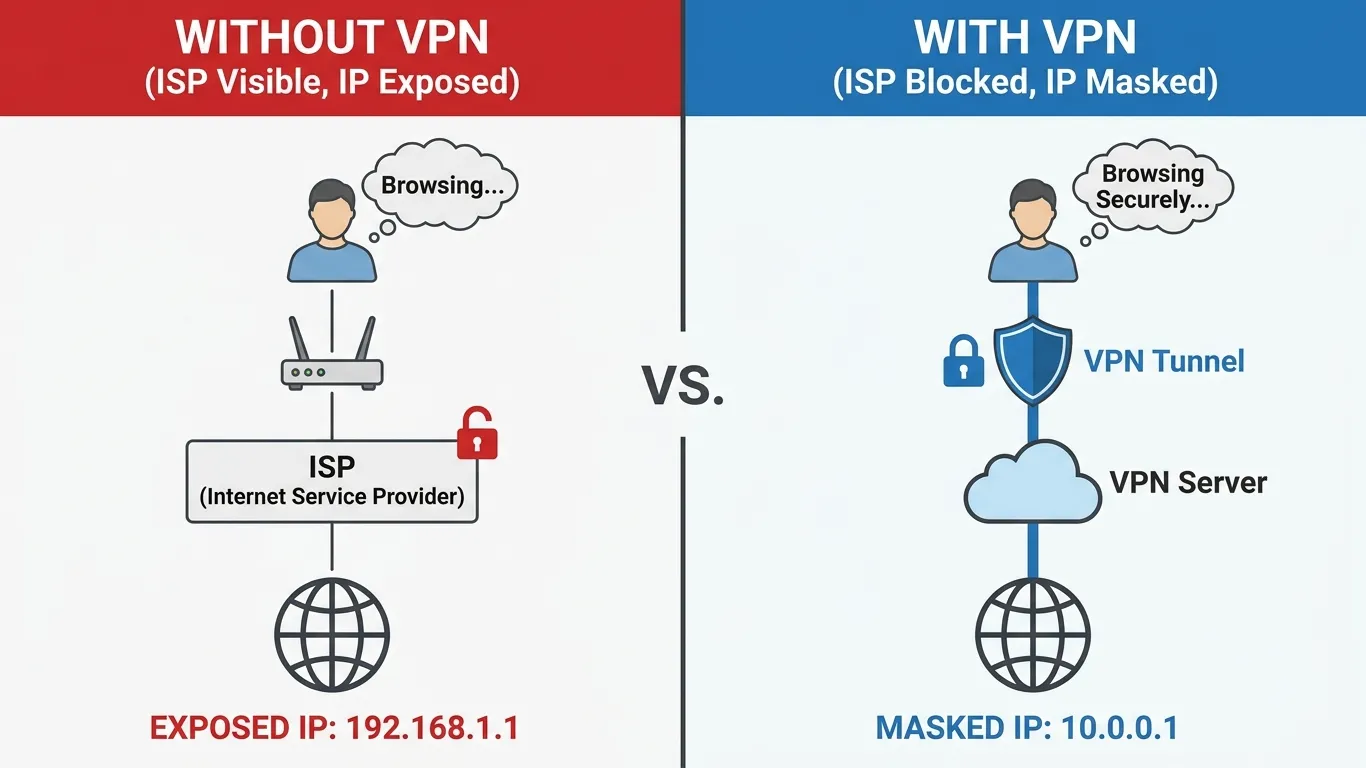
A VPN (Virtual Private Network) is a service that encrypts your internet connection and routes it through a secure server in a location of your choosing, masking your IP address and preventing your internet service provider, network administrators, or anyone intercepting your traffic from seeing what you're doing online.
That's the snippet-ready definition. But let's go deeper, because the word "virtual" is doing a lot of work there that most guides gloss over.
When you connect to the internet normally, your device talks directly to every website and service you visit. Your Internet Service Provider (ISP) sits in the middle of all of this — routing your traffic, logging it, and in many countries, legally selling anonymized versions of it to advertisers. Every website you visit also sees your real IP address, which can be used to identify your approximate location, your device, and over time, patterns in your behavior.
A VPN changes this entirely. Think of it like sending all your mail through a trusted third-party postal service that strips your return address from every envelope before forwarding it. The recipient (the website) only sees the forwarding address (the VPN server). Your ISP only sees that you sent something to that postal service — not what was inside any of the envelopes.
The "private network" part comes from how VPNs were originally designed. Long before consumer VPN services existed, businesses used VPN technology to let remote employees securely access company servers — effectively extending the company's private internal network over the public internet. That corporate use case is still very much alive, but the technology has since evolved into something anyone can use to protect their everyday browsing, streaming, and communications.
The Common Misconception Worth Addressing Right Away
Many people assume a VPN makes them completely anonymous. It doesn't — and that distinction matters. A VPN hides your activity from your ISP and from the networks you use. It masks your IP address from websites and trackers. But your VPN provider itself can still see your traffic, which is why the provider's logging policy matters enormously. It also doesn't stop you from being identified through your browser fingerprint, your logged-in accounts (Google knows who you are whether you're using a VPN or not), or cookies already stored on your device.
Privacy and anonymity are different things. A VPN gives you meaningful privacy. It doesn't give you invisibility.
Why Your Internet Privacy Is More At Risk Than You Think
Most people understand, in a vague way, that their online activity isn't totally private. What they underestimate is how systematically that activity is collected, stored, and monetized.
In the United States, a 2017 ruling by Congress removed FCC regulations that had previously required ISPs to get explicit customer consent before selling browsing data. Since then, major ISPs have openly packaged and sold customer data to advertising networks. A 2021 investigation by The Markup found that several major US carriers were selling real-time location data to third parties — sometimes without customers' knowledge. This isn't a theoretical risk. It's a business model.
Outside the US, the picture varies but is rarely better. In the UK, the Investigatory Powers Act (nicknamed the "Snooper's Charter") requires ISPs to store customers' browsing histories for up to 12 months, accessible to government agencies without a warrant. In Australia, similar data retention laws have been on the books since 2015. In countries with more authoritarian governments, the surveillance infrastructure is even more extensive — and the consequences of exposure can be far more serious than targeted ads.
Then there's the public network problem. A 2019 report from Kaspersky found that 25% of public Wi-Fi hotspots around the world use no encryption whatsoever. On an unencrypted network, data transmitted without HTTPS protection is essentially readable by anyone on the same network who wants to look. Even on networks that appear protected, sophisticated attackers can use techniques like ARP spoofing to position themselves between your device and the router.
And ISP surveillance and open Wi-Fi are just the obvious threats. Data brokers operate entire industries built on aggregating everything they can find about you — from your browsing patterns to your purchase history to your physical location — and selling it to anyone willing to pay. The FTC estimated in 2014 that the nine largest data brokers alone held an average of 3,000 data points on every American adult. That number has only grown.
None of this means you should live in digital paranoia. But it does mean that "I have nothing to hide" is a poor reason not to care about privacy. Your data has real value. Other people are profiting from it. A VPN is one straightforward tool for taking some of that control back.
How Does a VPN Work? Step by Step
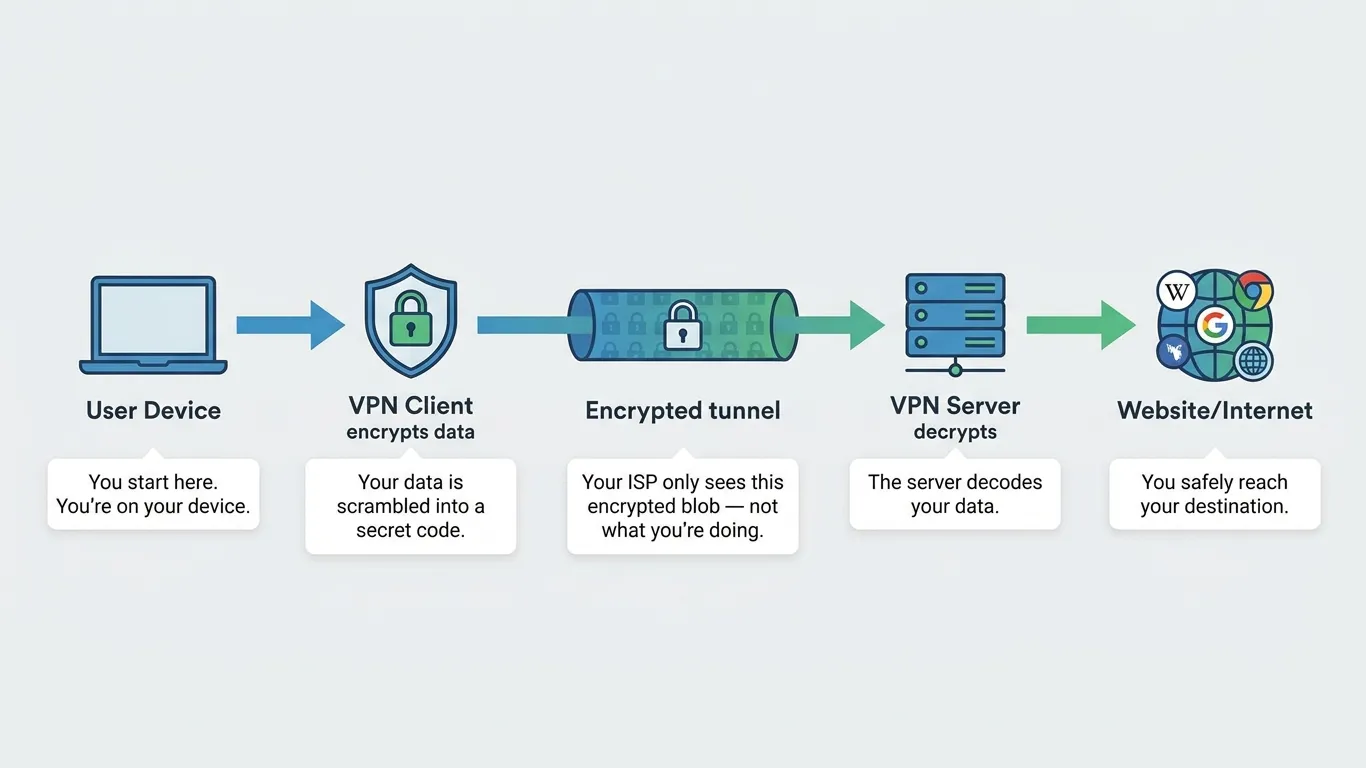
Understanding the mechanics of a VPN doesn't require a computer science degree. Here's what actually happens when you connect.
Step 1: You launch the VPN app and connect to a server. Your device establishes a connection to a VPN server operated by your provider. You typically choose a location — say, a server in Germany or Japan — though most apps let you auto-connect to the fastest available server if you don't have a preference.
Step 2: Your device and the VPN server perform a "handshake." Before any of your real data travels, your device and the server authenticate each other and agree on an encryption method. This process uses public-key cryptography — the same underlying technology that secures online banking. It confirms you're talking to a legitimate server (not an impersonator) and establishes the keys needed to encrypt and decrypt your data.
Step 3: A secure encrypted tunnel is created. All internet traffic leaving your device now gets wrapped in a layer of encryption before it goes anywhere. Think of this as sealing every piece of data in a locked box. Even if someone intercepts the boxes mid-transit, they can't open them without the key — which only your device and the VPN server possess.
Step 4: Your traffic exits through the VPN server. The VPN server decrypts your requests, forwards them to the websites and services you're visiting, receives the responses, re-encrypts them, and sends them back to your device. From the outside world's perspective, your traffic is coming from the VPN server's IP address, not yours.
Step 5: Your ISP sees almost nothing useful. Your ISP can see that you're connected to a VPN server and roughly how much data is flowing. That's it. They can't see which websites you visited, what you searched for, what you downloaded, or what you said in messages sent through encrypted apps.
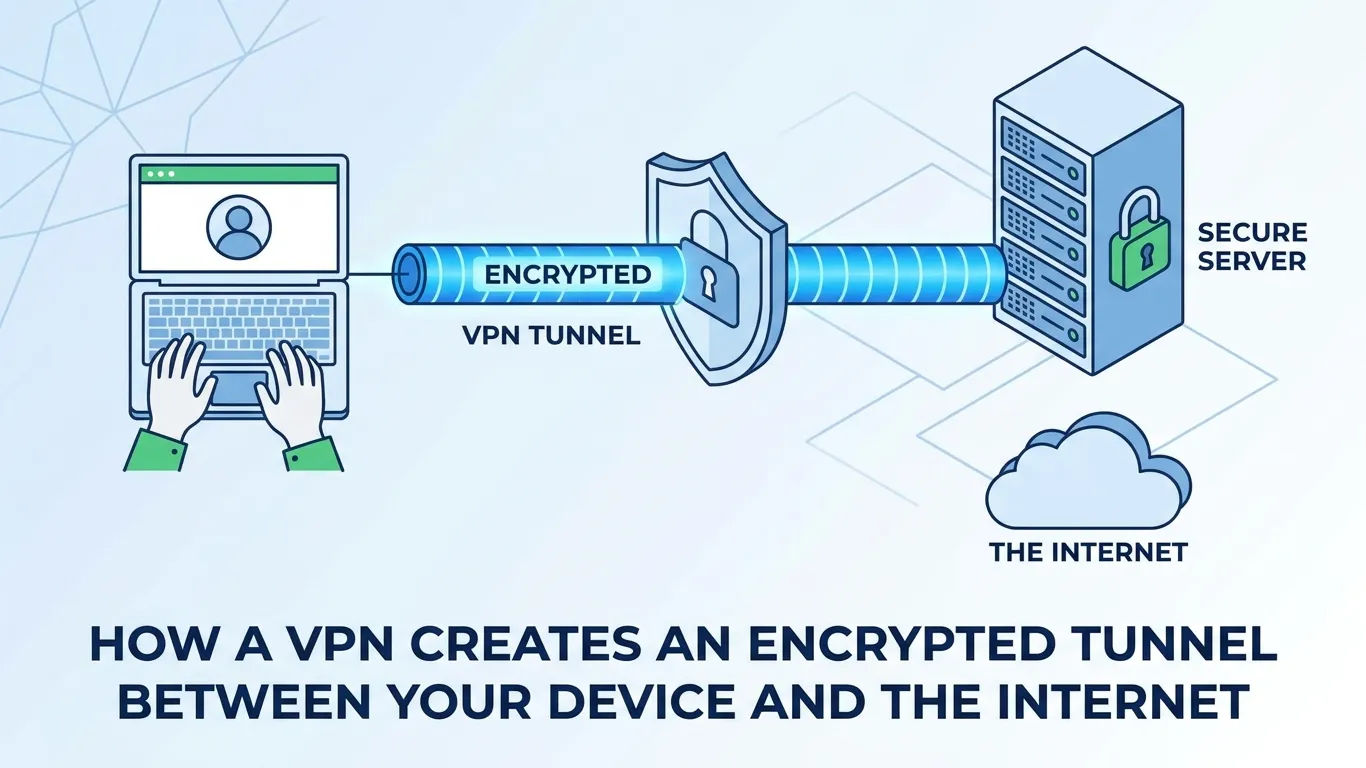
What Encryption Actually Means Here
Most reputable VPNs use AES-256 encryption — the same standard used by the US government to protect classified information. To put this in perspective: AES-256 has 2^256 possible encryption keys. If you lined up every computer on earth and set them all to work simultaneously trying to brute-force that key, it would take astronomically longer than the current age of the universe to crack it. For all practical purposes, AES-256 encryption is unbreakable by any technology that currently exists.
What this means for you: when your VPN is active and functioning correctly, your data in transit is safe. The encryption itself isn't the weak link. The weak links, as we'll cover shortly, lie elsewhere.
VPN Protocols Explained
When you look at VPN settings, you'll often see options for different "protocols" — OpenVPN, WireGuard, IKEv2, L2TP/IPSec. Most guides either skip over this entirely or bury it in jargon. Here's what each one actually means for your speed and privacy.
A VPN protocol is the set of rules that governs how your device and the VPN server communicate — how they establish the connection, how they encrypt the data, and how efficiently they pass that data back and forth. Choosing the right protocol has real, practical effects on your experience.
Protocol | Speed | Security | Best For |
|---|---|---|---|
| WireGuard | Very Fast | Excellent | Everyday use, mobile, streaming |
| OpenVPN | Moderate | Excellent | Privacy-focused use, bypassing censorship |
| IKEv2/IPSec | Fast | Very Good | Mobile devices, frequently switching networks |
| L2TP/IPSec | Moderate | Good (not ideal) | Legacy devices only |
| PPTP | Fast | Poor (outdated) | Avoid — compromised encryption |
WireGuard
WireGuard is the newest major protocol and, as of 2026, the one most privacy experts recommend for general use. Its codebase is roughly 4,000 lines — compared to OpenVPN's 400,000. Fewer lines of code means fewer places for security vulnerabilities to hide, and it's been extensively audited. In speed tests, WireGuard consistently outperforms older protocols by a significant margin because it runs closer to the operating system's core networking layer. If you're streaming, gaming, or just want a fast and reliable everyday VPN, WireGuard is typically the right choice.
OpenVPN
OpenVPN has been the gold standard for over a decade. It's open-source, extensively battle-tested, and configured correctly, it's extremely hard to block — making it the protocol of choice for users in countries that actively try to restrict VPN usage (China, Russia, Iran). It's slightly slower than WireGuard and requires more overhead, but it's extremely configurable and trusted by security professionals. If you're connecting from a region with active VPN censorship or if you're doing sensitive work, OpenVPN over TCP is a solid choice.
IKEv2/IPSec
IKEv2 is especially well-suited to mobile devices because of its ability to quickly reestablish a connection when you switch networks — say, from Wi-Fi to mobile data during a commute. It's fast, secure, and natively supported on iOS and macOS. The downside is that it can be easier to block than OpenVPN, making it less ideal for high-censorship environments.
What to Avoid
PPTP (Point-to-Point Tunneling Protocol) was the first widely-used VPN protocol, developed in the 1990s. By modern standards, it's deeply compromised — researchers have demonstrated methods to break PPTP encryption in under 24 hours. No reputable VPN provider recommends it, and if you see a service promoting it as a primary option, that's a red flag.
What a VPN Cannot Protect You From
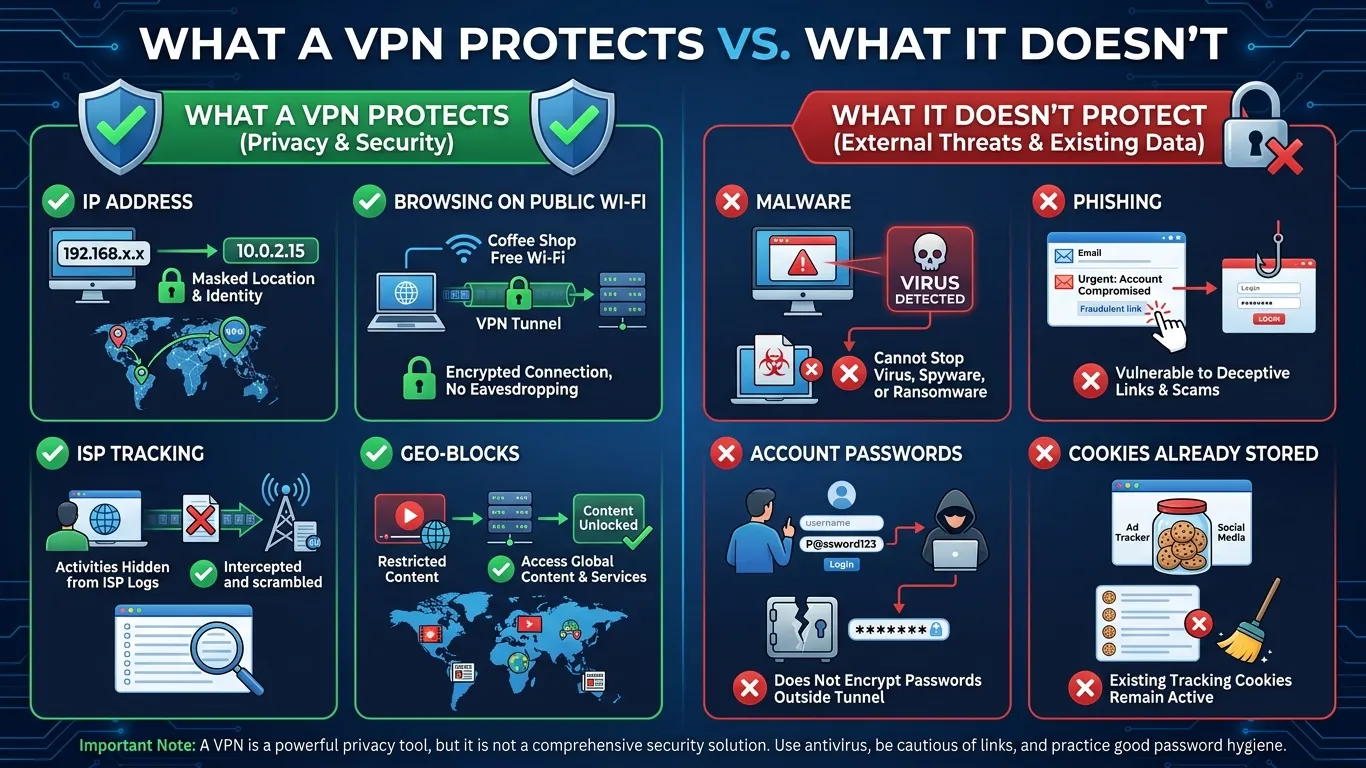
Here's the section most VPN guides don't want to write. A VPN is a powerful and genuinely useful tool. It's not a complete solution to online security. Conflating the two is how people end up making dangerous mistakes — like assuming a VPN means they can click on anything safely.
A VPN does not protect you from malware. If you download a file infected with ransomware or click on a link that installs spyware, the VPN is completely irrelevant. Encryption protects data in transit — it doesn't scan files for malicious code, quarantine threats, or prevent you from being compromised by your own actions. For malware protection, you need a reputable antivirus or endpoint security tool, not a VPN.
A VPN does not protect you from phishing. Phishing attacks work by convincing you to voluntarily hand over your credentials — by visiting a fake website that looks like your bank, or responding to an email impersonating your employer. A VPN doesn't evaluate the authenticity of websites. It just routes your traffic to them. If you type your Gmail password into a convincing fake Gmail page while connected to a VPN, your credentials are just as compromised as they would be without one.
A VPN does not make you anonymous on platforms where you're logged in. Google, Facebook, Amazon, and every other platform where you have an account know exactly who you are — because you told them. A VPN hides your IP address, but it doesn't prevent your behavior from being tied to your account identity. If you're logged into Google Chrome and browsing with a VPN, Google still has a detailed profile of your activity.
A VPN does not fully prevent browser fingerprinting. Your browser sends a surprisingly unique combination of information to every website you visit: your screen resolution, installed fonts, browser version, timezone, language settings, graphics card details, and more. This "fingerprint" can be used to identify and track you across sessions even without cookies or your IP address. Some privacy-focused browsers (like Brave or Firefox with specific settings) help mitigate this; a VPN alone doesn't.
A VPN is only as trustworthy as its provider. This is possibly the most important limitation on this list. When you use a VPN, you're shifting who can see your traffic from your ISP to your VPN provider. If your VPN provider has poor security practices, collects detailed logs of your activity, or is based in a jurisdiction that compels data disclosure, you may not be meaningfully better off. Always evaluate a provider's logging policy, jurisdiction, and independent audit history before trusting them with your traffic.
Understanding these limitations isn't a reason to skip a VPN. It's a reason to use one as part of a broader approach to online security rather than as a standalone solution.
Who Actually Needs a VPN? Real Use Cases by User Type
Generic VPN guides talk about "online privacy" as if everyone's situation and threat model is identical. They're not. Here's an honest breakdown of who benefits most from a VPN, and exactly how.
Students
University and school networks often come with aggressive content filtering, surveillance of network activity, and logging of every site visited. Beyond the privacy concerns, many academic institutions block peer-to-peer networks, certain research tools, and even some journalism or political sites. A VPN lets students access the open internet from campus networks without their browsing being logged by the institution's IT department. It also protects sensitive traffic — financial information, personal communications, health queries — on shared dorm Wi-Fi that might not be properly secured.
Remote Workers
The corporate remote work model has a genuine security problem: employees accessing sensitive company systems from home networks, coffee shops, hotel Wi-Fi, and airport lounges — all of which have vastly different (and often poor) security postures. Many companies provide their own VPN for accessing internal systems, but this doesn't protect personal traffic or the employee's own devices during the same session. A personal VPN running alongside a corporate VPN protects all other traffic. It also matters when traveling internationally — some countries actively intercept business communications, and a VPN adds a meaningful layer of protection against that.
Frequent Travelers
Airports, hotels, and cafes are prime hunting grounds for data theft. Beyond interception risks, travelers in certain countries face another challenge: censored internet. If you travel to China, Russia, the UAE, or dozens of other countries with significant internet restrictions, large portions of the web are simply unavailable — including Google, WhatsApp, many news sites, and streaming platforms. A VPN with robust protocol options (specifically OpenVPN or obfuscated servers) lets you maintain access to your normal services. It also lets you avoid geo-based price discrimination: flights, hotels, and even software subscriptions are frequently priced differently based on where the request appears to come from.
Streaming Enthusiasts
Streaming libraries are licensed on a country-by-country basis. A Netflix subscriber in the US gets a substantially different content library than one in the UK, Canada, or Japan — and some titles are only available in specific regions. A VPN lets you connect to a server in the country whose library you want to access. This is technically against most streaming services' terms of service, but it's been a widespread use case for years with no meaningful consequences for individual users. The practical challenge is that major streaming platforms actively try to detect and block VPN IP addresses, so this use case requires a VPN provider that regularly rotates its server IPs.
People Concerned About Surveillance
This covers a wide spectrum — from people who are simply uncomfortable with their ISP profiling them, to journalists protecting sources, to activists in countries with repressive governments, to ordinary citizens in democracies with broad surveillance laws. For most people in this category, a no-logs VPN from a jurisdiction outside the major intelligence-sharing alliances (the so-called "Five Eyes," "Nine Eyes," and "Fourteen Eyes" countries) provides a meaningful privacy improvement. For high-risk individuals — journalists, lawyers, dissidents — a VPN is one important layer of a more comprehensive operational security approach.
UCN VPN — Built for the Way Real People Use the Internet
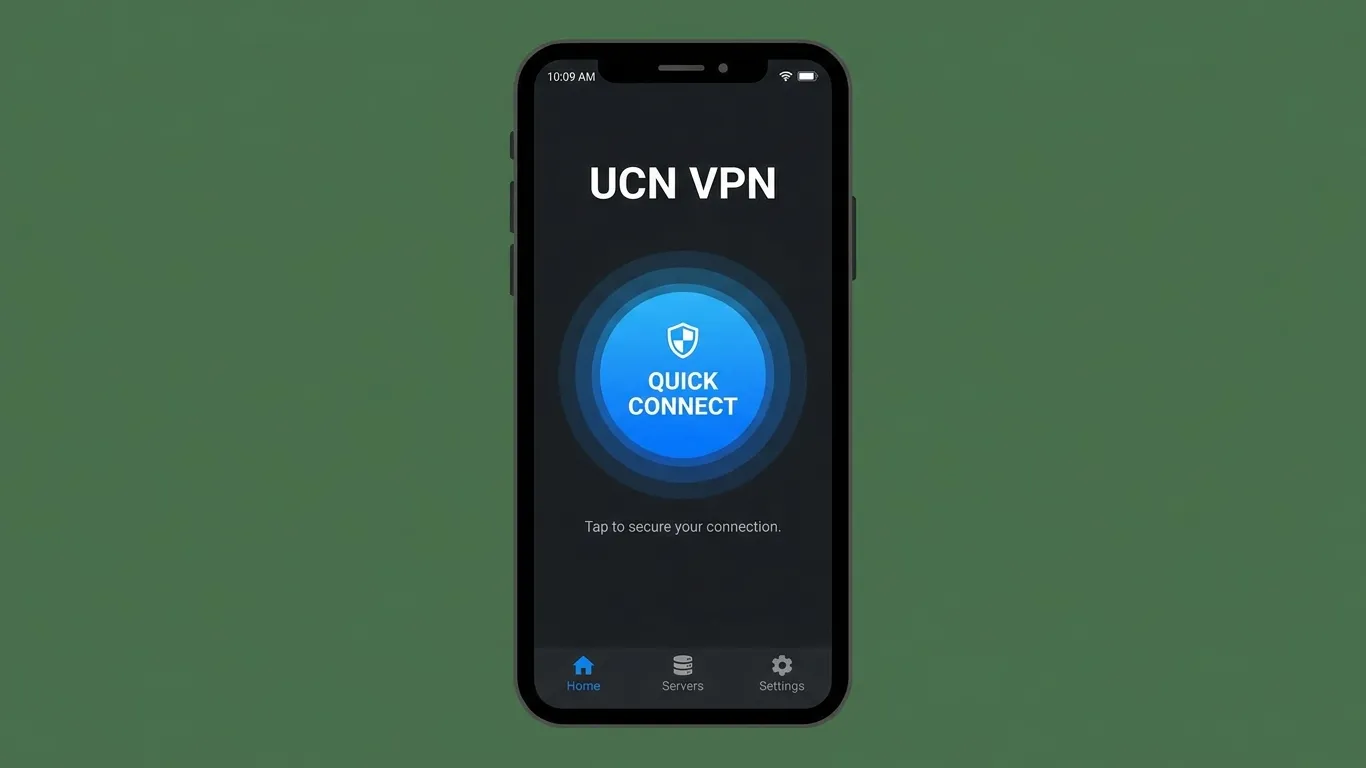
Most VPN services are built with one user type in mind: the power user who already knows what WireGuard is and why it matters. UCN VPN takes a different approach — it's designed to be immediately useful for the student who just wants campus Wi-Fi protection and the road warrior who needs a reliable connection in Bangkok just as much as the privacy enthusiast who's read every audit report.
A few things stand out about UCN VPN when you look at it through the lens of what this guide has covered.
First, protocol flexibility. UCN VPN supports both WireGuard and OpenVPN, giving you speed when you're streaming or working from home and resilience when you're traveling through regions that actively try to block VPN connections. You don't have to choose — the app makes it easy to switch based on what you need.
Second, the logging policy. The weakest link in most VPN setups isn't the encryption — it's the provider's data practices. UCN VPN operates under a strict no-logs policy, meaning your browsing history, connection timestamps, and IP addresses are not stored. This isn't just a marketing claim; it's the foundation of what makes a VPN trustworthy.
Third, and this matters more than people realize: kill switch functionality. If your VPN connection unexpectedly drops, a kill switch immediately cuts your internet access rather than silently reverting to your unprotected real IP address. It's the difference between a brief inconvenience and an exposure you didn't know happened. UCN VPN includes this as a default-on feature.
If you've read this far and decided a VPN makes sense for your situation, UCN VPN is worth a serious look. Not because it's perfect for every use case, but because it's built with transparency and usability in mind — which is exactly what most beginners actually need.
Frequently Asked Questions About VPNs
Does a VPN slow down your internet?
Yes, to some extent — but often less than you'd expect. Routing your traffic through an additional server and encrypting it adds latency and reduces throughput. In practice, with a modern protocol like WireGuard and a nearby server, the slowdown is often under 10% of your base connection speed and imperceptible during normal browsing. On slower connections or distant servers, the impact is more noticeable. The speed hit is a real trade-off, but for most uses, it's a minor one.
Is using a VPN legal?
In most countries, yes — VPNs are completely legal tools used by businesses and individuals worldwide. However, some countries restrict or prohibit VPN use, including China, Russia, Iran, North Korea, Belarus, and a handful of others. If you're traveling to or residing in one of these countries, check local regulations. Even in restrictive countries, it's typically the content accessed that's illegal, not the VPN itself — though enforcement varies.
Can my ISP see that I're using a VPN?
Your ISP can see that you're connected to a VPN server — the encrypted traffic itself is visible, even if its contents aren't. Some advanced VPN configurations use "obfuscation" to make VPN traffic look like ordinary HTTPS traffic, which hides even the fact that you're using a VPN. This is primarily useful in countries that actively try to block VPN access.
Does a VPN protect you on public Wi-Fi?
Yes — this is one of the strongest use cases for a VPN. On an unencrypted or poorly secured public Wi-Fi network, a VPN encrypts your traffic before it even leaves your device, making it unreadable to anyone intercepting the network. It doesn't protect against every threat on a public network (for example, a compromised router can still redirect you to fake sites), but it eliminates the most common interception risks effectively.
What's the difference between a VPN and incognito mode?
They address completely different things. Incognito mode prevents your browser from saving your browsing history, cookies, and form data locally — on your own device. It does nothing to hide your activity from your ISP, the network you're on, or the websites you visit. A VPN hides your activity from external observers but doesn't clear anything from your local device. For true privacy, you'd want both.
How do I know if my VPN is actually working?
The simplest check: with your VPN connected, search "what is my IP address" on Google. The IP address shown should be different from your real one, and the location shown should match your VPN server's location, not your actual location. You can also use sites like ipleak.net to check for DNS leaks — cases where your DNS requests slip outside the VPN tunnel and reveal your activity to your ISP despite the connection appearing active.
Should I leave my VPN on all the time?
That depends on your threat model and your tolerance for occasional minor slowdowns. Keeping it on continuously gives you consistent protection — especially important if you frequently connect to different networks. Some people keep it on all the time by default and only turn it off for specific services that detect and block VPN connections (certain banking apps, for example, trigger fraud alerts when you log in from an unfamiliar IP). Most modern VPN apps make toggling this effortless.
Is a free VPN safe to use?
With rare exceptions, no. Running VPN infrastructure is genuinely expensive — servers, bandwidth, staff, security audits. If a VPN is free, the provider is almost certainly covering those costs some other way, most commonly by logging and selling user data to the very advertisers and data brokers you're trying to avoid. Several well-documented cases — including the 2021 investigation that exposed a group of free VPN apps collecting and selling user data despite claiming no-logs policies — illustrate this clearly. For serious privacy protection, a paid VPN from a provider with a verified no-logs policy is worth the cost.
Conclusion
Three things are worth holding onto after reading this.
First, a VPN is a meaningful privacy tool — not a perfect one. It protects your traffic from your ISP, from surveillance on public networks, and from sites tracking your real IP address. That's genuinely valuable. But it doesn't stop malware, phishing, or the tracking done by platforms where you're already logged in. Use it as one layer of a sensible security approach, not as a complete solution.
Second, the protocol and provider you choose matter more than most guides admit. WireGuard is the right choice for most people most of the time. And your VPN provider, whoever it is, should have a verified no-logs policy, be headquartered outside aggressive surveillance jurisdictions, and have ideally been independently audited. Don't take marketing claims at face value.
Third, your use case should drive your choice. A student who wants campus Wi-Fi privacy has different needs than a journalist working in a high-risk region. A streamer who wants access to foreign libraries needs different server infrastructure than a remote worker securing company access. The best VPN for you is the one that fits your actual situation.
If you're ready to start, UCN VPN is designed to handle all of the scenarios covered in this guide — with an interface that doesn't require a security background to navigate. Give it a try and see how much clearer the internet feels when you're in control of who can see your traffic.
Your data is yours. You get to decide who has access to it.